

The query seems simple, but the work doesn't end with exporting a list. A competitive report mixes real opportunities with unrelated brands, searches unrelated to the business, outdated URLs, and terms whose volume would never translate into customers.
At SEOMOS, we use this data as a radar, not as a publishing order. First, we define the objective, then we identify the gap, and only then do we decide which URLs deserve attention. In this guide, you can follow the entire process with Semrush, compare it with Google Search Console, and download the same prioritization structure.
If you don't have a payment tool: jump to free step-by-step method. Separate what you can observe on Google from a platform's estimates; no single source reveals all of a competitor's conversions.
Prepare the analysis before looking for competitors
Configuring a tool doesn't solve an ambiguous objective. Before researching, write down what line of business you want to boost, who your target customer is, in which country they're searching, and what action you expect them to take. "Get more traffic" doesn't allow you to evaluate a keyword; "attract Colombian companies comparing business management software" does.
- Choose a single regional base. Country, language, device, and date must be consistent. Do not mix metrics from the United States with a plan for Colombia.
- Take inventory of your URLs. Gather current services, categories, and articles. Add pages that already receive impressions in Search Console to avoid duplication.
- Define exclusions. Prepare a list of third-party brands, jobs, support, reviews, free downloads, or products that you don't offer, depending on your business.
- Set the result. Each keyword should end up linked to a URL and a decision, not just remain as a row without anyone responsible.
How to identify your SEO competitors on Google
A commercial competitor sells a similar solution. An SEO competitor occupies the searches you need to win. It could be another company, but also a media outlet, marketplace, directory, university, or specialized website. That's why it's not a good idea to start with a list based solely on well-known names.
Search for five to ten core search terms in your category and note which domains are repeated. Then, combine two or three comparable companies with one or two rivals that dominate those SERPs. They should share a market, language, and a reasonable proportion of relevant topics; a huge portal isn't always a useful reference.
If your domain is new or Semrush isn't showing enough data yet, start with seed keywords: service, category, problem, and location. Examine their results on Google, register recurring domains, and analyze those sites in organic search engine optimization (SEO). This way, you build your competitive group from the SERP, without relying on your website having a history.
How to find competitor keywords with Semrush step by step
The workflow combines three reports: Competitors to discover domains, Pages to understand which URLs concentrate visibility and Keyword gap to compare opportunities. Semrush allows you to view keywords, positions, intent, volume, difficulty, URLs, and other metrics in Organic Positioning, and export the results.
1. Confirm the rivals in Organic Positioning
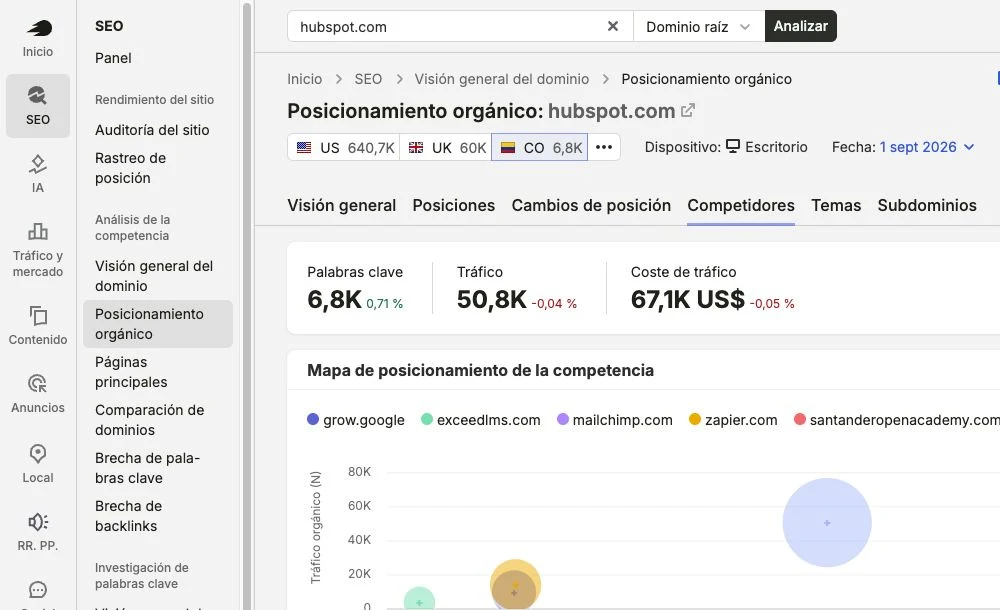
Go to SEO → Organic Positioning, enter your domain, select the correct database and open Competitors. The report ranks domains based on their shared keywords and estimated traffic. Use it to find candidates and open each one before adding it to the analysis.
2. Review the pages that generate your visibility
Within the rival's territory, it opens Pages. Prioritize URLs with estimated traffic, multiple keywords, and an intent related to your offer. Semrush homepages report It helps detect hubs, categories, or guides that explain the competitor's coverage; an isolated list of terms does not reveal that architecture.
Record the URL, its main keyword, the page type, and the number of associated terms. If ten keywords lead to the same competing guide, you should probably study only one topic and not create ten articles.
3. Configure the Keyword Gap
Open Keyword gap, Enter your domain in the "You" field and add up to four competitors. Select organic keywords, country, device, and date. Compare root domains to study the entire market, or use subfolders and URLs when analyzing a specific line. Maintain the same scope for all profiles.
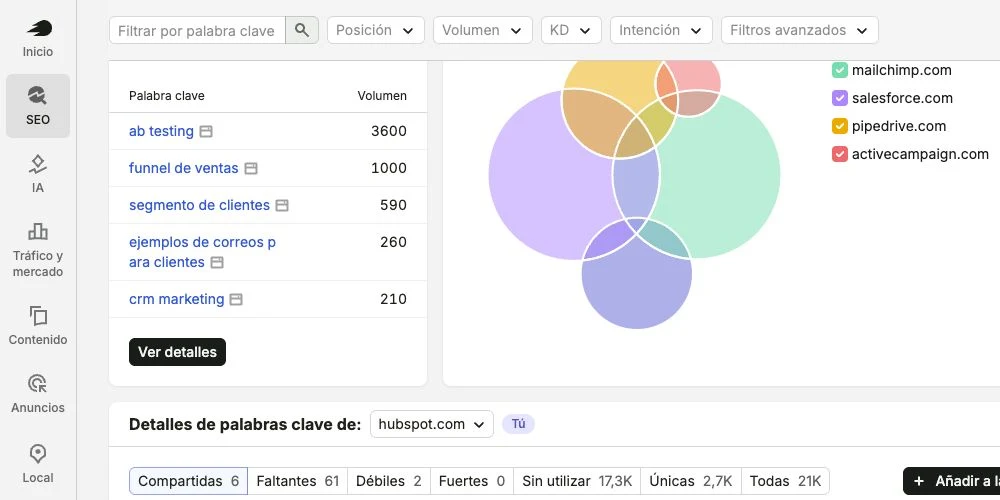
It begins in Without using To see terms where at least one competitor appears and you don't, check. Missing for topics covered by all rivals and Weak For queries where you already rank, but are still below the target. The latter tend to lead to faster improvements when the URL itself already meets the user's intent.
4. Apply an initial filter that you can repeat.
For an initial analysis in Colombia, at SEOMOS we used this preset as an initial cutoff, not as automatic approval:
- Opponent's position: between 1 and 20.
- Volume: 30 or more estimated monthly searches in the Colombia database.
- KD: from 0 to 44.
- Intention: commercial, transactional or informational depending on the defined objective.
- Exclusions: Third-party brands, jobs, support, opinions and terms without associated offer.
If there are very few rows left, relax one criterion at a time and record the change. In a B2B niche, a keyword with lower volume might justify investment; in a mass category, you might need a larger cutoff. Key Results (KRs) and volume help with ranking, but they don't replace reading the SERP.
Which columns to export and how to review each opportunity
Export only the filtered rows. Retain these columns from the organic positions report: keyword, intent, volume, KD, rival's position, rival's domain, and ranked URL. Add your own position, your own URL, country, device, date, three evaluation fields —fit, feasibility and differentiation— and a final decision.
Open the competitor's URL and the current SERP. Check if it dominates a landing page, category, comparison, guide, tool, or video; observe the angle, updates, evidence, and features of the result. The report may associate a different URL than the one currently displayed, so manual verification prevents building a strategy based on outdated data.
We don't publish a URL just because Semrush shows demand. The opportunity advances when the search is relevant to the business, the intent matches, there's a credible way to compete, and we can offer something that the current result doesn't solve.
Real-world example of a keyword gap in Colombia
In the screenshot, we compared hubspot.com with mailchimp.com, salesforce.com, pipedrive.com, and activecampaign.com in Colombia. Semrush listed these queries among the top opportunities on September 2, 2026. These are estimates to guide the review, not actual traffic or conversions.
| Keyword | Estimated volume | Review required | Possible decision |
|---|---|---|---|
| ab testing | 3.600 | Do you master a guide or a tool? | Create or discard based on product |
| sales funnel | 1.000 | Which stage of the funnel does SERP require? | Improve an existing guide |
| customer segment | 590 | Is the intention conceptual or functional? | Consolidate with segmentation |
| Examples of emails for clients | 260 | What examples do you expect from the results? | Create if it connects with the offer |
| CRM marketing | 210 | Is the search commercial or educational? | Improve the business page |
“AB testing” has the highest estimated demand, but “CRM marketing” may be closer to the product. This difference illustrates why ordering solely by volume produces an attractive roadmap on one page but a weak one for the business.
How to Cross Keyword Gap with Google Search Console
Search Console does not reveal competitor lawsuits. performance report This helps you compare the gap with data from a property you control: queries, pages, clicks, impressions, CTR, and average position. This comparison allows you to discover when you already have a URL near the first page and should improve it before creating another one.
- In Performance → Search Results, choose the same period, country, and device as the analysis.
- Export queries and pages with clicks, impressions, CTR, and position.
- Normalize the keywords and cross-reference them with the Keyword Gap file.
- Isolate queries with impressions and own position between 11 and 20.
- Open your own URL and confirm that it responds to the same intention before marking it as "Improve".
Semrush also recommends Review positions 11–20 as opportunities for improvement. Even so, a median position mixes locations, devices, and times: use it for research, not as proof that all impressions occurred on the second page.
Prioritize with four decisions: create, improve, consolidate, or discard
Rate from one to five the commercial fit, viability and differentiation. It's not a scientific formula: it's a consistent way to document the criteria. Then it assigns the intent group to a canonical URL and makes a decision.
| Decision | When to use it | Next step |
|---|---|---|
| Create | There is no URL that resolves the intent | Define format, main keyword, cluster, and evidence |
| Improve | A relevant URL already receives signals, but falls below | Adjust intent, coverage, UX, update, and links |
| Consolidate | Several URLs compete for the same need | Choose canonical, merge value, and redirect if appropriate |
| Rule out | There is no fit, viability, or own contribution | Record the reason why it should not be returned to the backlog. |
It groups variations that share a common intention. Review the long-tail keywords, But avoid creating a separate page for each one. The chosen URL also needs a place within the interlinking strategy and a clear relationship with the offer.
What to learn from a competitor's paid keywords
Keyword gap analysis also allows you to compare organic, paid, and PLA data. Terms where a competitor is investing can reveal business categories, messaging, and landing pages that warrant review. However, they don't necessarily demonstrate profitability: a paid keyword might be in testing, poorly configured, or part of a different strategy.
Use them to formulate questions: What offer appears in the ad? Which page receives the click? Does that intent have a solid organic URL? Is it worth coordinating SEO and Paid MediaExternal investment is a sign of research, not evidence of return.
How to research competitor keywords for free
- Define country and intention. Choose three to five seed searches related to your offer and note the date and device.
- Look at the SERPs. Record the domains that appear multiple times, the specific URL, the page type, and the questions they answer. Don't confuse a commercial competitor with an informational result.
- Expand with modifiers. Test problems, services, cities, and terms like "price," "comparison," or "how." Group together variations that require the same answer.
- Compare your site. Search Search Console for related queries and URLs; identify whether you should improve an existing page, create a new one, or discard the topic.
- Prioritize and document. For each group, keep track of the query, the SERP, the competitor URL, your target URL, and an editorial decision. Repeat the review before publishing because results change.
Without a paid platform, build an initial list of seed keywords. Look for categories, problems, and modifiers like "price," "comparison," "alternative," or "how to"; record recurring domains, titles, formats, and URLs. Group the results by intent and compare them with Search Console to see if your website already has a related page.
The free method requires more manual work and doesn't offer the same scale, but it maintains the correct logic: discover, validate, group, and decide. If you still need to clarify the concepts of intent, volume, and difficulty, check out our guide on What are keywords?.
Errors that distort competitive analysis
- Mix regional bases. Volume data from another country does not automatically reflect local demand. Keep market, device, and date visible in each row.
- Analyze a newly migrated domain. Historical data may pertain to previous URLs or be incomplete. Check redirects, the previous domain, and the migration date.
- Trust the report URL without opening the SERP. The page that Semrush registered may not be the one that ranks today. Confirm the current result.
- Use a seasonal month as a normal reference. Christmas, tuition fees, taxes, or events affect demand and market positions. Compare equivalent periods.
- Export before filtering. Thousands of rows don't improve the analysis. Applying the cut-off first makes it easier to review every opportunity for truth.
Frequently asked questions about competitor keywords
How often should the analysis be repeated?
Conduct a thorough review every quarter or semester, depending on market trends, and perform shorter checks when the market changes, a competitor emerges, a migration occurs, or Google significantly alters the SERP. Keep track of the date and filters to compare equivalent periods.
How many keywords should I review in the first analysis?
Start with 50 to 100 pre-filtered rows, not the entire export. This volume allows you to open URLs, validate intent, and document decisions. If the team completes the review consistently, expand the next batch without changing the criteria mid-process.
Does the process change for ecommerce and local SEO?
Yes. In e-commerce, categories, attributes, availability, transactional intent, and PLA (Plain Authoritative Pages) are important. In local SEO, location, maps, website pages, and geographic modifiers are key. The discover, validate, and prioritize workflow remains the same, but the SERPs and business fields change.
Is Semrush's data accurate?
These are not direct measurements of competitor traffic or conversions. They are estimates based on your keyword databases and observed results. They serve to uncover and compare opportunities; the final decision should be validated by the SERP, the ranked URL, and your own data.
Can the analysis be done without Semrush?
Yes. You can start with seed keywords, manually review Google results, register recurring domains and pages, and compare ideas with Search Console. You'll lose scale and some comparative metrics, but you'll retain the validation and decision-making process.
Is it possible to analyze a competitor without accessing their private data?
Yes. The competitive research described here uses publicly available results and estimates from external tools. It doesn't require accessing other people's accounts, circumventing controls, or copying content. It analyzes demand and formats; then creates your own response based on your company's experience and evidence.
Download the template to apply the method
We've prepared a worksheet with the analysis fields, lists to create, improve, consolidate, or discard, automatic scoring, and an opportunity summary. Download it. SEOMOS keyword gap template and works in batches of 50 to 100 terms.
If you need to turn this research into a roadmap connected with pages, content, and business, learn how we work on a SEO strategy for businesses.