

A sales pipeline is the system that allows you to view, sort, and manage sales opportunities according to the specific stage they are in. It's not a contact list or a decorative chart: it should show which business can move forward, what the next step is, who's responsible, and where the process is stalling. A well-designed chart helps prioritize work, accurately estimate revenue, and improve the prospect experience.
When opportunities are scattered across spreadsheets, emails, WhatsApp conversations, and the team's collective memory, it's difficult to distinguish a likely sale from a contact who barely requested information. The pipeline transforms this fragmented activity into a visible process. Each opportunity occupies a specific stage, has an estimated value, a next action, and can be analyzed using common criteria.
This guide explains what a sales pipeline is, how to define its stages, what data and metrics it needs, and what automations to use without losing the human element. The goal isn't to fill a CRM with fields, but to build a tool that reflects the company's actual sales process.
What is a sales pipeline
A sales pipeline represents the opportunities that are open throughout a sales process. An opportunity enters the pipeline when it meets a minimum criterion defined by the company and advances when a verifiable event occurs: the need is confirmed, a meeting is held, a proposal is presented, or terms are accepted. Whether it is won or lost, it leaves the open pipeline but retains its history.
The central unit is the chance, not a person's name. A single contact can be involved in more than one purchase, and a business sale can involve several people. That's why it's best to link accounts, contacts, opportunities, activities, and communications instead of keeping everything as separate notes.
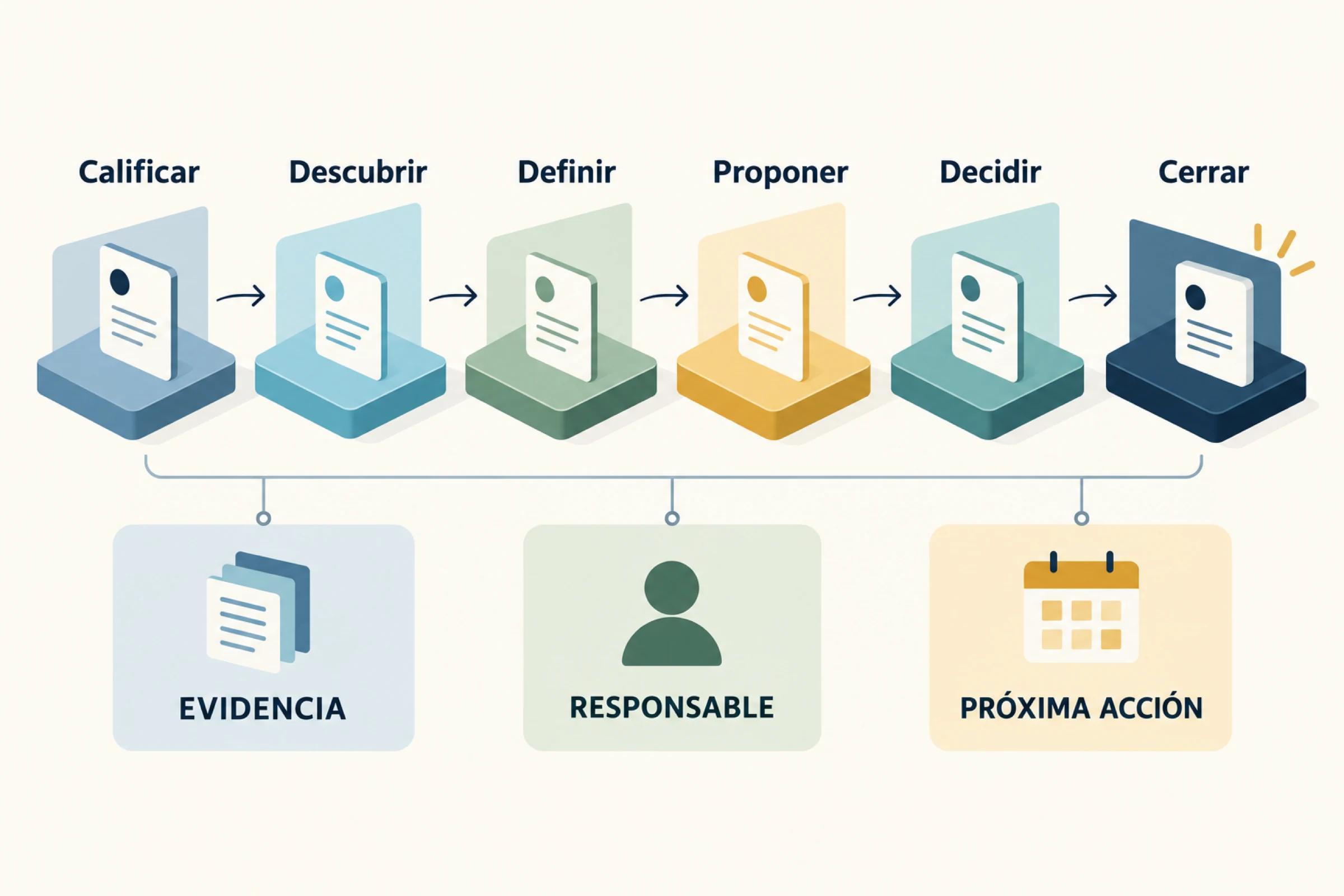
A useful pipeline answers at least five questions: What stage is each deal at? What needs to happen to move forward? What is the next action? Who will take it and when? What evidence supports the estimated value and date? If the dashboard doesn't allow you to answer these questions, it's probably just a visual classification.
Difference between a sales pipeline and a sales funnel
Pipeline and funnel describe the same process from different perspectives. pipeline It is operational: it shows individual deals, pending actions, responsible parties, and time within each stage. funnel It is analytical: it groups volumes and conversion rates to see how many prospects move from one level to another.
For example, the pipeline indicates that the Empresa Andina opportunity is in the proposal stage, valued at 18 million pesos, and requires a technical review on Friday. The funnel shows that, during the quarter, 42 opportunities reached the proposal stage and 13 became clients. One helps you decide what to do today; the other helps you understand the overall performance.
It also differs from lead scoring. The scoring system attempts to estimate which contacts deserve attention based on attributes or behaviors. The pipeline stage should be tied to an actual sales event. A person can earn many points for visiting pages and still not have agreed to a sales conversation.
| Aspect | Pipeline | Funnel |
|---|---|---|
| Unit | Individual opportunity. | Set of contacts or opportunities. |
| Ask | What action will allow this business to move forward? | What proportion advances between levels? |
| Use | Daily monitoring and forecasting. | Conversion and acquisition analysis. |
| Risk | Outdated stages or stages with no next action. | Comparing incompatible cohorts or definitions. |
Stages of a sales pipeline
There is no universal sequence. An enterprise software sale, a consulting engagement, and a recurring service don't all require the same number of stages. Documentation for platforms like Pipedrive recommends aligning the pipeline with the actual sales process, and Microsoft provides examples that typically include qualification, development, proposal, and closing. These examples serve as a starting point, not a mandatory template.
A medium-complexity B2B model could use the following stages:
- Opportunity to qualify: There is a commercial request or signal, but it remains to be verified whether it fits, is necessary, and is possible to continue.
- Discovery: The context, the problem, the people involved, the constraints, and the expected outcome are investigated.
- Defined solution: Both parties understand the overall scope and it is confirmed that the company can handle it.
- Proposal submitted: The prospect received a concrete offer with scope, investment, assumptions, and conditions.
- Evaluation or negotiation: Commercial, technical, legal or purchasing aspects are resolved.
- Closing: The opportunity is marked as won or lost with date, final value and reason.
Names should describe situations that are recognizable to the entire team. Labels like “hot,” “interested,” or “follow-up” are often ambiguous: two salespeople might interpret them differently. It’s better to associate progress with actions, such as “discovery meeting completed” or “proposal submitted to decision-maker.”.
It's also not advisable to create a separate stage for each activity. Sending an email, making a call, or leaving a message are actions, not necessarily changes in the buyer's status. A pipeline with fifteen columns can obscure the fact that several represent the same level of decision.
How to define entry and exit criteria
Each stage requires an entry criterion, an exit criterion, and a policy for stalled opportunities. The entry criterion explains what must be true to place the business there. The exit criterion defines the evidence needed to move forward. The stall policy establishes when to review, return, pause, or close an opportunity.
In “Discovery,” for example, the input might require an identifiable contact and a need that the company already addresses. The output might require a completed conversation, a documented problem, identified next participants, and an agreed-upon action. Having a meeting scheduled does not equate to having completed the discovery process.
The qualification process deserves special attention. It must distinguish between the general interest and an opportunity that justifies the investment of business time. Need, fit, authority or influence, decision-making process, urgency, and budgetary capacity can all be reviewed without turning the dialogue into an interrogation. When there is no fit, disqualifying with a clear reason preserves information for analyzing demand, campaigns, and losses.
Reasons for loss also need consistent categories: budget, priority, competitor, lack of response, unmet scope, deferred decision, or conditions. A closed list helps with comparison; a free-form note adds context. Marking everything as “not interested” eliminates learning.
Minimum data that each opportunity must have
The CRM should request enough information to take action, not everything that might be interesting someday. Overloading the record reduces adoption and encourages fabricated data. As a starting point, each opportunity might include:
- company or account and related contacts;
- main product, service or need;
- current stage and date of entry into it;
- estimated value and currency;
- probability, if used, with a documented rule;
- estimated closing date and the reason behind it;
- sales manager;
- next action, responsible party and due date;
- source of opportunity and campaign when it is known;
- notes, documents and traceability of communications.
UTM parameters can help link a request to a digital campaign, while the business source should maintain an origin that is understandable to the team. It's not advisable to overwrite the first source every time the contact returns to the site. If you need to organize capture and follow-up in one place, review the approach of SEOMOS AI CRM according to the actual needs of the process.
The next action field is one of the most valuable. “Follow up” isn’t enough; “send corrected scope to Laura on September 12” does enable action. Open opportunities without future action should appear in a control view.
How to create a sales pipeline step by step
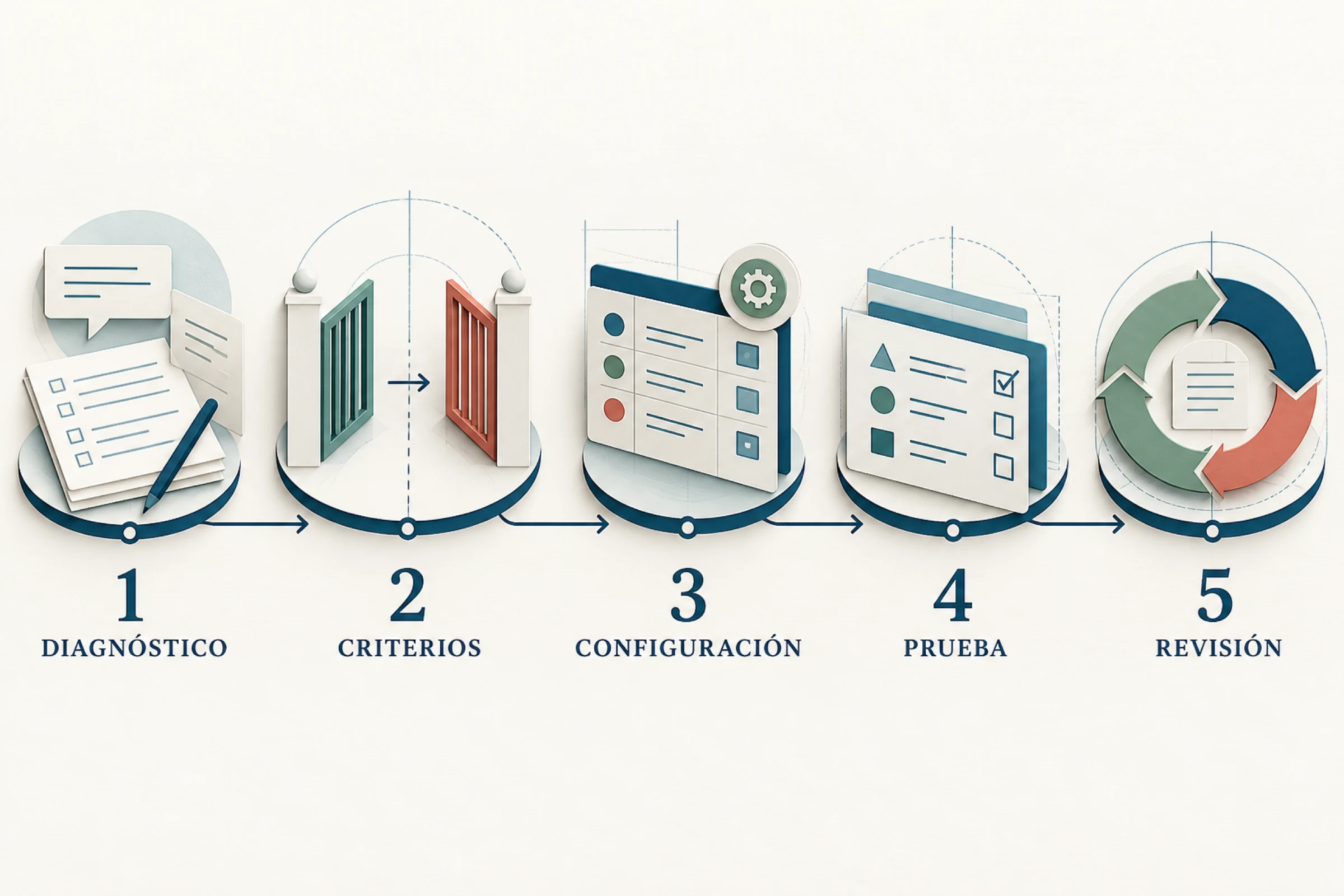
1. Reconstruct the current process. Interview the sellers and review recent deals won and lost. Identify events that truly changed the likelihood of a purchase. Don't design the stages solely based on the tool.
2. Define the beginning and the end. Decide when a contact becomes an opportunity and what constitutes winning, losing, or pausing. This boundary prevents inflating the pipeline with incomplete forms and unsuitable inquiries.
3. Create few verifiable steps. Start with a manageable sequence and document inputs and outputs. If two stages don't lead to distinct decisions, they can probably be combined.
4. Establish fields and responsible parties. Define which data is required at any given time, who updates it, and how often. The required fields can increase at each stage; not everything needs to be requested when creating the business.
5. Migrate only current opportunities. Clean up duplicates, invalid contacts, and abandoned deals before importing. Maintain a backup and correspondence between the original and new fields.
6. Test with real cases. Simulate a simple business, a long-term one, a lost business, and one that returns after a pause. Address any friction issues before testing the team with the new process.
7. Review the pipeline periodically. A brief meeting can focus on roadblocks, changes, risks, and next steps. Reading all the cards aloud is pointless if the board already contains that information.
Metrics for evaluating the pipeline
Metrics should be compared within a stable timeframe, segment, and definition. An overall rate can combine very different products, sources, and business cycles. Start with a few key measures that will lead to a decision.
- Open value per stage: Sum of the estimated value of active opportunities. Not equivalent to guaranteed income.
- Conversion between stages: proportion of opportunities of a cohort that advanced from one stage to the next.
- Closing rate: won opportunities divided between closed opportunities, with a defined window and unit.
- Time per stage: days that an opportunity remains in each state; helps to locate blockages.
- Sales cycle: Time between the defined start and the won close. The median usually holds up better against extreme cases than the average.
- Antique: time of an open opportunity versus the usual behavior of comparable businesses.
- Value earned: final value of closed sales, separate from the estimated value they had before.
- Activity with result: meetings held, proposals accepted, or next steps achieved, not the number of emails alone.
The weighted pipeline multiplies the value of each opportunity by a probability. It can serve as a scenario, but a generic probability assigned per stage alone does not make the calculation certain. It is advisable to compare past forecasts with actual results and document the assumptions. To build a dashboard with actionable indicators, also consult the guide on What is a KPI and how to choose one?.
Pipeline coverage compares the relevant open value to a future target. Its interpretation depends on the closing rate, cycle, team capacity, and time period. There is no single approach that applies to all companies. If historical data is limited, it is more responsible to present scenarios rather than a single forecast.
Useful automations without losing control
Automation should reduce repetitive tasks and alert you to exceptions. It shouldn't advance business based on ambiguous signals or send sensitive messages without context. Before automating, define who reviews errors, how the workflow stops, and where traceability is maintained.
Reasonable automations include assigning opportunities by zone or service, creating a task upon entering a stage, reminding users of overdue activities, alerting them when a deal exceeds its expected timeframe, copying validated data to a proposal, and recording the origin of a form. It can also connect with processes of marketing automation to provide context to the sales team.
In WhatsApp, the CRM can centralize the history and associate it with an opportunity, provided that consent, authorized templates (where applicable), and channel policies are respected. An automated response can confirm receipt or request simple information. Negotiations, complex objections, or explaining a proposal typically require human intervention.
Don't automatically change a proposal to "proposal" just because a document was generated; require that the proposal has been delivered to the appropriate contact. Nor should you close an opportunity as lost simply because a few days have passed. Create an alert, review the context, and apply a consistent policy.
Hypothetical pipeline example for a B2B company
Hypothetical example. A service firm receives 80 requests per month from forms, referrals, and WhatsApp. Before implementing the pipeline, all are saved as "leads," and each advisor uses different tags. Management sees a high number but doesn't know how many opportunities have a confirmed need or which ones are awaiting a decision.
The team defines an opportunity as arising when there is an identified company, a commensurable need, and acceptance of a dialogue. It establishes five open stages: qualification, discovery, solution definition, proposal presentation, and decision. Win and loss are considered closing states. Each stage has exit criteria and a review timeframe.
An opportunity is submitted via a campaign form with UTM parameters. The system assigns a responsible party and creates a task. During the call, it's confirmed that the service is a good fit, but the final decision involves finance. The opportunity moves to the discovery phase only after the problem, participants, and the next meeting are documented. After presenting the proposal, the consultant records a technical review instead of leaving a generic note.
After several cycles, the company discovers that many opportunities remain in the "defined solution" stage without a decision-maker. Instead of requiring more calls, it adds a criterion: the approval process must be understood before preparing a complete proposal. The change aims to reduce premature work; its effect is evaluated by comparing equivalent cohorts.

Common mistakes when managing a pipeline
Confusing contact with opportunity. If every download or message enters the pipeline, the volume increases while visibility worsens. Define the qualification threshold.
Update only before the weekly meeting. An outdated dashboard cannot guide daily operations or forecasting. Updates must occur close to the business event.
Advance through activity, not through results. Five unanswered calls don't necessarily mean the buyer has made progress. Record activity, but move to the next stage when evidence emerges.
Leaving businesses without further action. An open, stagnant opportunity consumes attention. Use exception views to review expiration dates and age.
Use probabilities as certainties. A weighted value is a conditional estimate. Compare it to actual closings and communicate ranges where appropriate.
Creating too many fields and automations. Complexity increases errors and resistance. Each field must support a real decision, monitoring, or obligation.
Not analyzing the losses. Consistent reasons help identify problems with supply, market, qualification, or process. They also allow for linking sales work to the customer acquisition cost without attributing everything to an isolated campaign.
Checklist to review your pipeline
- The beginning and end of an opportunity have explicit definitions.
- Each stage reflects a buyer's progress and has an exit criterion.
- All open businesses have a designated person in charge and a scheduled next action.
- Value, currency, and estimated date have an identifiable source or assumption.
- The reasons for loss use comparable categories and context notes.
- The views separate stagnant, expired, and future-less opportunities.
- Metrics are segmented by period, service, source, or customer type when necessary.
- Automations maintain traceability and a form of human review.
- The team reviews and adjusts the process with evidence, not just adding columns.
If your business process is already fragmented or requires specific integrations, an initial review can prevent a flawed migration. You can talk to SEOMOS to evaluate the flow, data, and automations before setting up a tool.
Sources consulted
Document consultation: September 9, 2026. The stages, formulas and the case described are operational proposals of this guide; they must be adapted to the business model and do not constitute a sales promise.
- Pipedrive: fundamental stages of a sales pipeline.
- Pipedrive Support: Stage Customization.
- Microsoft Learn: Moving opportunities between stages.
- Microsoft Learn: Lead scoring and opportunity creation.
- Microsoft Learn: Data and status of an opportunity.
Frequently asked questions about the sales pipeline
What does pipeline mean in sales?
It's an operational representation of business opportunities at each stage. It allows you to see which deals are open, what evidence supports their status, who is handling them, and what the next step is. It's not just a contact list or an automated revenue forecast.
How many stages should a pipeline have?
It depends on the buying and selling process. Many companies can start with four to seven open stages, as long as each one represents a distinct decision and has verifiable criteria. If two columns don't change the team's actions, it's worth evaluating whether they should be combined.
What is the difference between pipeline and CRM?
The pipeline is the process and view of opportunities. A CRM is the system that can store contacts, accounts, activities, communications, opportunities, and reports. A pipeline can be designed before choosing the CRM; the tool should implement the process, not define it on its own.
How do I know if an opportunity is stalled?
Compare your time in the stage and your last interaction with similar deals. Also, check if you have a next agreed-upon action. A fixed threshold can serve as an alert, but it shouldn't automatically close the deal without considering the cycle, the segment, and the context.
What metrics are essential?
As a basis: opportunities and open value per stage, conversion rate, closing rate, time per stage, cycle length, age, and earned value. The final choice depends on the team's decisions. Define the period, cohort, and formula to avoid misleading comparisons.
Can the entire pipeline be automated?
Automating decisions that require context is not recommended. However, assignments, tasks, reminders, alerts, and the capture of validated data can be automated. Stage changes, closures, and sensitive messages require clear criteria, traceability, and human review when ambiguity exists.