

An XML sitemap is a file that lists the URLs that a site considers important for search engines. It helps facilitate discovery and organize crawl monitoring, but it doesn't force Google to index a page or improve its ranking on its own. A useful sitemap contains canonical, indexable, absolute, and up-to-date URLs; one bloated with redirects, errors, or duplicates can obscure the problem it's trying to solve.
Publish a file called sitemap.xml It doesn't complete the job. First, you have to decide which pages deserve to appear in search engines, verify that they respond correctly, and maintain the relationship between sitemap, canonical tags, internal links, and indexing status. On a small site, this review can be simple. On an e-commerce site, a multilingual portal, or a website with filters, the inventory changes daily and requires automated rules.
This guide explains how to create, validate, and review a sitemap without mistaking it for a guarantee of indexing. It includes examples for WordPress and e-commerce sites, a diagnostic process, and criteria for interpreting Search Console. If a clear inventory of themes and pages doesn't yet exist, it's best to start with the keyword research and the architecture before generating thousands of URLs.
Looking for a file to use as a reference? Go to minimal example of sitemap.xml and replace the domain, paths, and date with real data from your site.
What is an XML sitemap and what information does it communicate?
The sitemaps protocol defines an XML structure with an element <urlset>, an entry <url> per page and a <loc> Required with full address. Other fields, such as <lastmod>, These are optional. The file must use UTF-8 encoding and escape any characters that require it. You can review the syntax in the official Sitemaps protocol.
The primary function is not to describe everything that exists on the server. It's to present a coherent set of preferred URLs. Google recommends including the URLs you want to see in results and using absolute addresses, for example. https://www.ejemplo.com/categoria/producto/, not relative routes like /category/product/. If the same page works with different parameters, capitalization, trailing slashes, or protocols, the sitemap should show the chosen canonical version.
| Element | Use | Editorial or technical criteria |
|---|---|---|
loc |
Absolute URL of the page. | You must respond with the canonical version you wish to index. |
lastmod |
Date of last significant modification. | It should not be changed due to a cache purge or an irrelevant edit. |
changefreq |
Historical frequency estimate. | It does not replace the actual detection of changes and can be omitted. |
priority |
Relative priority within the same site. | It is not a ranking instruction and usually contributes little if everything is worth 1.0. |
A sitemap can also include extensions for images, videos, news, or localized versions. These should only be added when the content type and implementation justify them. An incorrect extension doesn't compensate for blocked images, pages without links, or conflicting language tags.
When do you need a sitemap and when does it not solve the problem?
Google indicates that a small, well-linked internal site with few multimedia resources may not need a sitemap to be discovered. Even so, it's often useful for technical inventory and tracking. Its value increases when the site is large, publishes frequently, has new sections with few links, uses multiple languages, or contains many images and videos that aren't easily found using HTML links.
The absence of a sitemap is rarely the sole reason why an important page might not appear. If the URL returns a 404 error, it's blocked by [the relevant website/platform]. robots.txt, includes noindex, Whether it's canonicalized to another page or only exists behind an interaction, adding it to the XML doesn't eliminate those barriers. Nor does it make repeated or useless content eligible for inclusion.
The sitemap is a signal of discovery and preference, not a mandate. Google's own documentation clarifies that submitting one is a suggestion and does not guarantee downloads, crawling, or indexing. Therefore, the audit must compare what is declared with what the site actually offers.
Which URLs to include and which to exclude
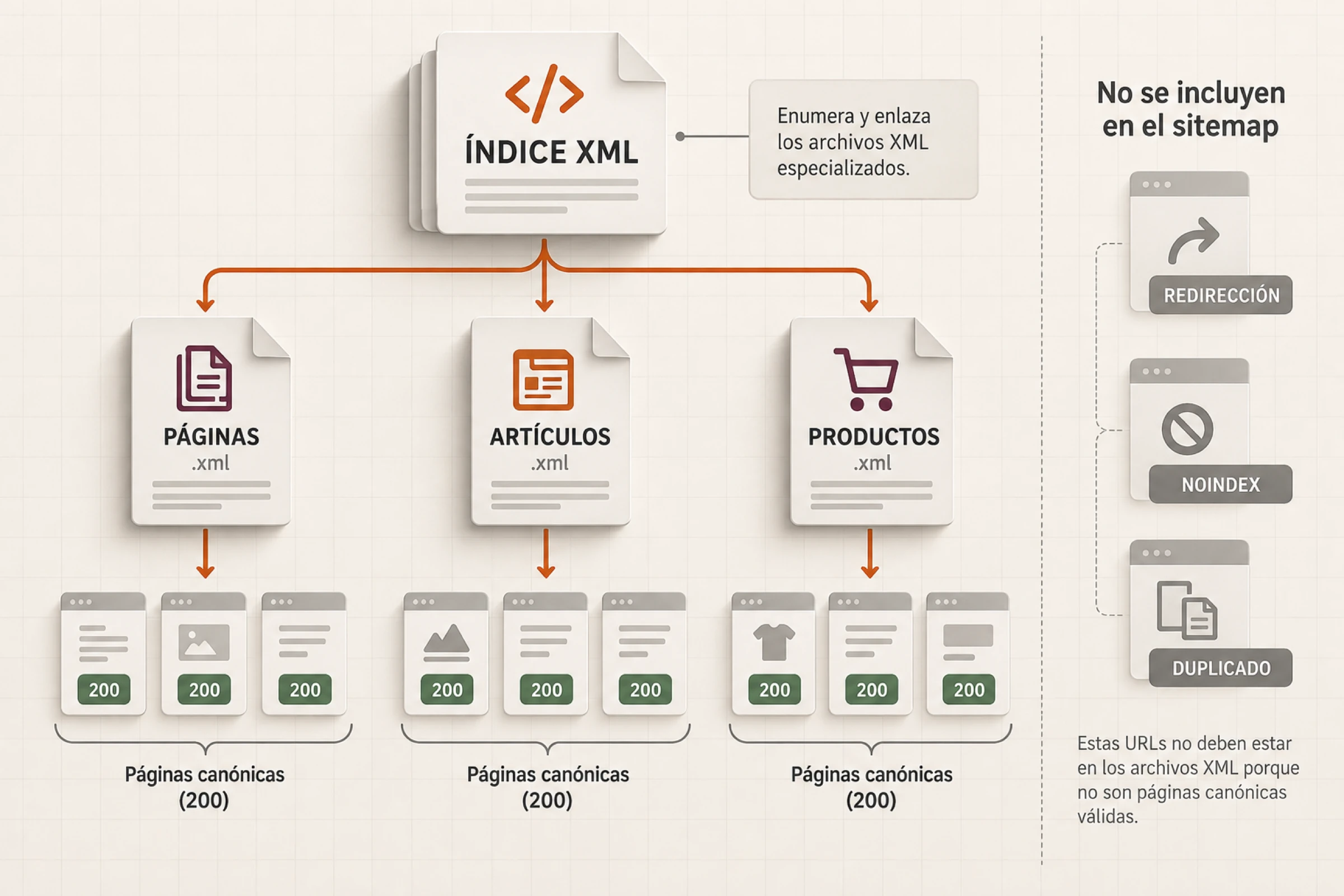
This includes pages that simultaneously meet four conditions: they respond with a 200 status code, allow indexing, are considered canonical, and provide a specific function within the architecture. In a blog, this would include featured articles, useful categories, and sales pages. In an e-commerce site, it would include categories, available products with persistent value, and content that helps customers make a decision.
Exclude URL with noindex, Redirects, 4xx or 5xx errors, internal searches, shopping carts, accounts, filters without their own request, tracking parameters, and duplicates. A page excluded from the sitemap may still be found by links; if it really shouldn't be indexed, you need to apply the appropriate directive or response. Removing a URL from the XML is not a deindexing mechanism.
Out-of-stock products require a more precise policy. If they are expected to return and the page still contains useful information, it can remain active. If the product is no longer available and an equivalent replacement exists, a redirect may be appropriate. If there is no alternative, a decision must be made between maintaining an informational page or restoring the product to its original status. Automating the immediate removal of all out-of-stock items can destroy URLs that retain demand, links, and usefulness.
Consistency with canonical tags is essential. Google considers inclusion in a sitemap a weaker canonicalization signal than a redirect or... rel="canonical"". If the XML file declares one URL and the page points to another as its canonical URL, the site sends different signals. The audit should resolve the cause, not simply resubmit the file.
How to create an XML sitemap
The appropriate method depends on the size and how the content is managed. For a few stable pages, it can be built manually, although updates will still be necessary. When the site has more than a few dozen URLs or changes frequently, generation should rely on the database or the CMS.
Use the CMS or WordPress
WordPress has included a sitemap system since version 5.5 and exposes providers for content types, taxonomies, and users. SEO plugins like Rank Math can replace or extend this output. Having two active, unchecked systems can create parallel indexes with different rules. Check which one responds and which file it references. robots.txt and which one was sent to Search Console.
Don't assume that all registered content should appear. Internal forms, templates, nonexistent author files, or empty taxonomies can be included via configuration. Review the plugin rules and the actual visibility of each type before hiding or including it.
Generate the sitemap from the source of truth
In an e-commerce or proprietary platform, use the same source that determines which products, categories, or pages are published. Define a reproducible query: active status, canonical URL, indexing permission, and editorial availability. Then, segment the output by type or size. This segmentation makes it easier to identify whether the problem is concentrated in products, categories, or content.
Google limits each file to 50,000 URLs or 50 MB uncompressed. When either limit is exceeded, it creates multiple files and a sitemap index. It's not necessary to fill each file to the maximum; grouping by section or template can improve the diagnostic process.
correct minimum example
https://www.example.com/services/seo/ 2026-09-09The date should reflect a substantial modification to the page, not the moment the file was generated. If all URLs display the current date every day, this data ceases to be helpful in distinguishing real changes.

How to validate the sitemap before submitting it
Start by opening the index and each file without an administrative session. Confirm status 200, XML content type, and absence of redirects. Then validate the syntax, encoding, and namespaces. A page that appears as plain text in the browser may contain an unescaped character that breaks the document.
The second validation compares each loc with the final answer. A small sample is not enough if there are multiple templates. Review at least a representative set of posts, pages, products, categories, and language versions. Track redirects, record the final state, and extract canonical, robots, and language tags.
The third validation is inventory validation. It compares indexable URLs from the crawl or database with the URLs in the sitemap. This reveals two important groups: missing eligible pages and declared URLs that shouldn't be there. The goal isn't to achieve a mechanical match with everything crawled, as there are also utilities and variations; it's to explain each difference.
| Control | Correct result | If it fails |
|---|---|---|
| HTTP | Index and files respond 200. | Correct route, cache, firewall, or generation. |
| XML | Well-formed document, UTF-8 and valid namespace. | Escape characters and correct the template. |
| URL | Absolute, 200, indexable and canonical. | Remove or correct the page and its inclusion rule. |
| Inventory | The differences have a documented explanation. | Review filters, pagination, taxonomies, and statuses. |
| Date | lastmod It only changes in response to relevant modifications. |
Link it to the actual content update. |
For a more comprehensive review, you can integrate these controls into a technical SEO audit. Automation should return a list of URLs and causes, not just a green message that hides exceptions.
How to submit your sitemap to Google
Google accepts submissions via the Sitemaps report in Search Console, the API, or a line item. Sitemap: within robots.txt. Search Console allows you to review the latest read and processing errors. The reference in robots.txt It facilitates discovery by trackers who consult that file.
Send the main index once you've grouped the necessary files. There's no need to resend a document that hasn't changed multiple times a day. After a migration or major change, keep a record of the date, number of URLs, and settings to help you understand what's happening.
A "Successful" status means that Google was able to process the file, not that all URLs were indexed. To investigate specific pages, use URL Inspection and Indexing Reports. Compare submitted, known, crawled, and indexed URLs without treating them as synonyms.
Common errors in sitemaps and how to diagnose them
Include redirects. This usually happens after changing slugs or the domain. Update the generator and internal links; don't keep the old URL in the XML indefinitely.
Mix HTTP, HTTPS, www and without www. Choose the canonical version and verify that the host, canonical, links, and sitemap are consistent.
Send pages with noindex. Determine whether the page should be indexed. Changing only the XML leaves the editorial contradiction unresolved.
Declaring false dates. Yeah lastmod It changes with each generation; correct the date source to reflect a relevant change.
Forget new pages. Check publication statuses, plugin filters, custom content types, and caches. A future page should not be uploaded before it is published.
Relying on the sitemap for navigation. Search engines also need crawlable links, and users require an understandable architecture. Strengthen the interlinking between related pages instead of leaving content orphaned.

Hypothetical example of an audit in an ecommerce
Hypothetical example. A store has 12,400 URLs in its index. Search Console processes the file, but a significant portion of the products don't appear in the results. The team believes they need to resubmit the sitemap.
The scan reveals 1,100 products that redirect, 860 variants with canonical links to the main page, and 430 out-of-date pages. noindex and 270 active products that are not in the XML. The total number makes it impossible to distinguish between these causes. The solution begins by separating the main product, variant, temporarily out of stock, discontinued product, and category.
The team retains only the eligible canonical entries, corrects the 270 omitted products, updates internal links, and creates separate archives for products and categories. It also links lastmod to changes in description, availability, or relevant structured data. Then it sends the index only once and monitors each section.
The immediate result is a consistent inventory, not a promise of indexing. Over the following weeks, sitemap reads, crawls, and indexing are compared. If a URL remains excluded, its specific cause is investigated instead of artificially increasing the submission frequency.
How to measure if the sitemap is fulfilling its function
It records how many eligible URLs there are per section, how many appear in the sitemap, how many return a 200 status code, and how many retain their own canonical tags. It also measures the time between a post and the first crawler visit when that data is available in logs. These metrics describe discovery and technical consistency.
Separate that measurement from organic performance. Clicks, impressions, and position depend on demand, relevance, quality, competition, and many other factors. A corrected sitemap can facilitate discovery, but it doesn't, on its own, prove the cause of growth. Document the date of the change and evaluate each group of URLs with context.
Repeat the audit whenever publishing rules, slugs, domain, SEO plugins, languages, filters, or product statuses change. A daily automated check can detect breaks; a periodic editorial review determines whether the inventory still reflects the site's strategy.
Sources consulted
Document consultation: September 9, 2026. The examples and checklists are operational proposals in this guide and do not represent guarantees of tracking or indexing.
- Google Search Central: Introduction to Sitemaps.
- Google Search Central: Create and submit a sitemap.
- Google Search Central: canonicalization signals.
- Sitemaps.org: XML protocol.
- WordPress Developer Resources: Sitemap System.
Frequently asked questions about XML sitemaps
Does a sitemap guarantee that Google will index my pages?
No. It facilitates discovery and communicates preferred URLs, but Google decides what to crawl and index. The page must also be accessible, canonical, indexable, and sufficiently useful. Search Console can confirm that the file was processed, but it doesn't guarantee the inclusion of every URL.
Which URLs should not appear in the sitemap?
Redirects, errors, noindex pages, duplicates, internal searches, shopping carts, accounts, and filters without their own intent are typically excluded. The rule should depend on the actual site architecture; removing a URL from the sitemap does not automatically deindex it.
Where is the WordPress sitemap?
WordPress includes a native index in /wp-sitemap.xml, Although an SEO plugin can override this and use a different path, check which URL is responding on your site, which one appears in robots.txt, and which one is submitted to Search Console before modifying the settings.
How often should I submit the sitemap?
There's no need to constantly resubmit a file that's already available. Keep your sitemap updated and accessible; submit it whenever you configure it or change its location. Search Console and robots.txt allow Google to re-access it. Avoid resubmitting the same version multiple times a day.
Should I use priority and changefreq?
These fields are optional and do not replace actual site signals. Do not assign maximum priority to all pages or invent frequencies. A correct canonical list and a reliable lastmod are usually more important decisions for maintaining a consistent inventory.
What do I do if Search Console says the sitemap is correct but pages are missing?
Compare the expected URLs with the XML and check each page using URL Inspection: HTTP response, robots.txt, noindex, canonical, content, and internal links. “Successful” confirms the file processing; it does not mean that all URLs will be indexed.